
October 1, 2026 · by Manoj Nair 7 min read
Microsoft Dynamics AX is a legacy enterprise ERP platform that organizations used to manage finance, supply chain, manufacturing, retail, and other core business operations. Microsoft has ended support for all major Dynamics AX releases, making Dynamics AX upgrade and modernization important for organizations still running the platform. Moving from Dynamics AX to Dynamics 365 Finance can help businesses modernize financial management with cloud-based automation, analytics, AI-powered capabilities, global operations support, and continuous updates.
Microsoft Dynamics AX has been a powerful enterprise resource planning (ERP) solution that enabled businesses to manage finance, supply chain, manufacturing, retail, procurement, and other core operations.
However, Microsoft Dynamics AX is now a legacy ERP platform. All major releases have reached end of life. If you are still running AX, it can be difficult to keep pace with evolving business requirements, modern integrations, automation, analytics, and AI. Moving to Dynamics 365 provides an opportunity to modernize your ERP environment while addressing legacy customizations, data, integrations, and processes.
So, what is Microsoft Dynamics AX, and why has it become a widely adopted enterprise ERP platform? This blog explores the platform in detail and showcases why organizations still running AX should consider moving to Dynamics 365 and what to evaluate when planning the transition.
What is Microsoft Dynamics AX?
Microsoft Dynamics AX is an enterprise ERP solution that helps organizations manage and integrate critical business processes across finance, supply chain, manufacturing, retail, procurement, and operations.
Microsoft released several versions of this ERP platform over the years, including Dynamics AX 2009 and Dynamics AX 2012. Today, the platform has evolved into the Dynamics 365 Finance and Operations portfolio, which includes applications such as Dynamics 365 Finance, Dynamics 365 Supply Chain Management, Dynamics 365 Commerce, and Dynamics 365 Project Operations.
Is Microsoft Dynamics AX Still Supported?
No. Microsoft Dynamics AX has reached the end of its product lifecycle.
- Mainstream support for Dynamics AX 2009 SP1, AX 2012, and AX 2012 R2 ended in October 2018, and extended support in April 2022.
- Mainstream support for Dynamics AX 2012 R3 ended in October 2021, followed by the end of extended support in January 2023.
This means organizations still running Dynamics AX are operating on a legacy ERP platform that is no longer receiving Microsoft’s standard product support.
Dynamics AX vs. Dynamics 365 Finance: What’s the Difference?
Dynamics AX and Dynamics 365 Finance belong to the same product family, but they serve different generations of ERP technology.
Dynamics AX is a legacy ERP platform, while Dynamics 365 Finance is a modern cloud-based application within Microsoft’s Finance and Operations portfolio. It carries forward many of the financial management capabilities organizations valued in AX while providing a modern platform for automation, analytics, integration, continuous updates, and AI-enabled experiences.
Organizations planning a Dynamics AX to Dynamics 365 Finance migration must treat the transition as a broader ERP modernization initiative, and not just a traditional software upgrade.
Top Reasons for Dynamics AX to Dynamics 365 Migration
Continuing to depend on a legacy ERP can make it harder to keep pace with changing business requirements, integrations, regulatory needs, analytics, automation, and AI. Here are the top reasons why it is vital to migrate from Dynamics AX to Dynamics 365:
- Reduce Legacy ERP Risk: An unsupported ERP environment can increase the operational and technical risks associated with maintaining critical business processes. Organizations may also become increasingly dependent on internal teams or specialized partners who understand older AX configurations and customizations.
- Modernize Legacy Customizations: Many long-running Dynamics AX environments have accumulated years of custom code, modifications, workarounds, and integrations. Organizations must use the migration as an opportunity to determine which customizations are still essential and replace those with standard Dynamics 365 functionality. Instead of carrying every legacy customization into the new environment, organizations can simplify processes and reduce technical debt.
- Take Advantage of Cloud ERP: Dynamics 365 enables organizations to move toward a modern cloud ERP environment. A cloud ERP can provide greater flexibility, easier access to modern Microsoft services, and a foundation for connecting business applications, data, analytics, automation, and AI.
- Leverage AI Capabilities: AI has become a critical part of enterprise software. Microsoft continues to add Copilot and AI capabilities across Dynamics 365 and Finance and Operations applications, including natural-language experiences and AI-assisted actions. For organizations still running AX, moving to Dynamics 365 can provide a foundation for adopting these newer capabilities as they become relevant to the business.
What are the Benefits of Dynamics AX?
Although Dynamics AX is now a legacy platform, understanding why organizations adopted it remains useful when evaluating a modernization strategy.
1. Comprehensive Financial Management
It helped organizations manage the general ledger, accounts payable, accounts receivable, budgeting, fixed assets, cash and bank management, financial reporting, and other core financial processes.
2. Supply Chain and Logistics Management
It supported procurement, inventory, warehouse management, sales, distribution, and other supply chain processes, helping organizations gain visibility across the movement of products and materials.
3. Manufacturing Capabilities
Manufacturers used AX to manage production, planning, inventory, procurement, and operational processes.
4. Global Business Management
It supported organizations operating across multiple countries through capabilities for multiple legal entities, currencies, languages, and localized business requirements.
5. Process Automation
Organizations could automate repetitive financial, procurement, supply chain, and operational activities, reducing manual effort and improving process consistency.
6. Microsoft Ecosystem Integration
The platform could connect with Microsoft’s broader technology ecosystem and other enterprise applications, providing organizations with a centralized foundation for business processes and data.
What are the Benefits of Dynamics 365 Finance?
For organizations modernizing from AX, Dynamics 365 Finance provides a modern foundation for financial and operational management.
Improve Financial Visibility
Dynamics 365 Finance helps organizations manage financial processes while providing insights into financial and operational performance.
Automate Finance Processes
Finance teams can use automation to streamline repetitive activities across areas such as accounts payable, collections, financial close, budgeting, and reporting.
Use AI and Copilot
Microsoft continues to expand AI and Copilot capabilities across Dynamics 365. Users can apply these capabilities to information discovery, natural-language interactions, insights, and business tasks.
Strengthen Forecasting and Planning
Modern finance teams need more than historical reporting. Forecasting, planning, analytics, and scenario analysis can help organizations make more informed business decisions.
Support Global Operations
Dynamics 365 Finance supports global financial operations, including multi-entity, multi-currency, and localized business requirements.
Connect Finance With Operations
Finance increasingly needs to work alongside supply chain, commerce, sales, analytics, and other business functions.
The broader Dynamics 365 ecosystem lets organizations connect these processes and data.
Dynamics AX to Dynamics 365 Migration Assessment
A successful Dynamics AX upgrade requires organizations to conduct a detailed assessment of their existing AX environment. This includes:
- Current Dynamics AX version and technical architecture
- Customizations and extensions
- Business processes and workflows
- Historical and transactional data
- Integrations with other applications
- Reporting and analytics
- Security and compliance requirements
- Country-specific localization requirements
- Legacy technical debt
- User requirements and change management
Upgrade or Reimplement Dynamics AX?
Organizations should not automatically assume that every AX customization needs to be replicated in Dynamics 365. Depending on the complexity of the existing environment, businesses can evaluate several approaches.
Microsoft provides upgrade paths for Dynamics AX 2012 R2 and R3 to Finance and Operations applications. AX 2009 customers can use Microsoft’s data migration tools to move data to Dynamics 365.
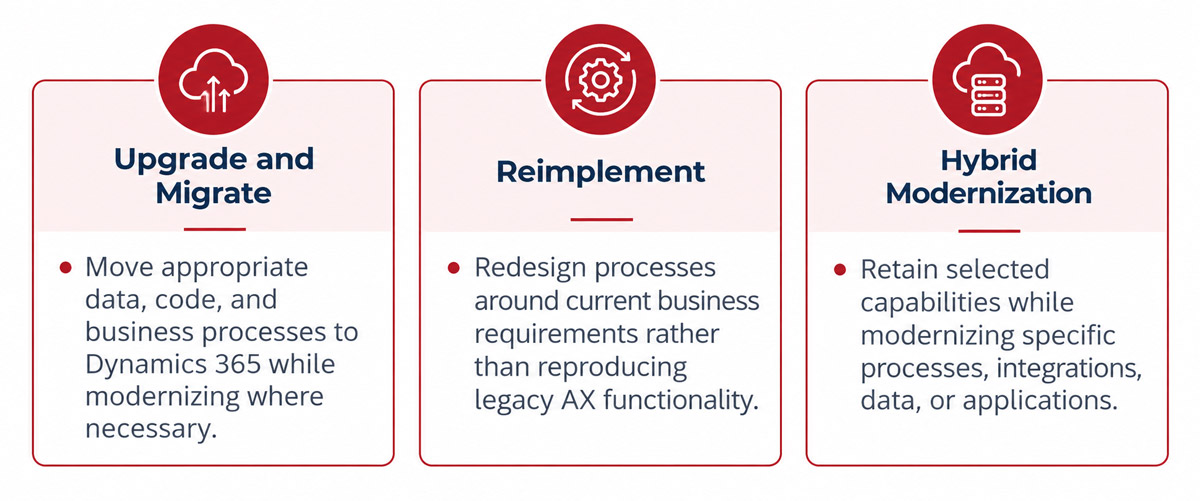
Choose an approach based on your organization’s AX environment, customization footprint, business requirements, data strategy, integrations, and long-term ERP roadmap.
Ready to Move From Dynamics AX to Dynamics 365?
Microsoft Dynamics AX played an important role in the evolution of enterprise ERP, helping organizations manage complex financial and operational processes for many years. But the ERP landscape has changed.
In 2026, the business case for an AX upgrade is clear: connected data, intelligent automation, real-time insights, scalable cloud infrastructure, and AI-enabled capabilities. With all major AX releases now past Microsoft’s support lifecycle, organizations still running AX should start planning their transition to Dynamics 365.
Synoptek can help you assess your existing Dynamics AX environment, identify modernization opportunities, and build a practical roadmap for moving to Dynamics 365 Finance. Speak with our Dynamics 365 experts to get started!