
August 3, 2026 · by Synoptek Team 6 min read
Microsoft is retiring Exchange Web Services (EWS), impacting organizations that rely on Dynamics CRM Exchange integration retirement timelines. Businesses using Dynamics CRM on-premises email integration with Exchange Online must evaluate their options before CRM 9.x support ends. This includes planning a potential Dynamics 365 migration from on-premises CRM to avoid disruption to email synchronization, activity tracking, and CRM-driven communications.
A few months ago, a Synoptek customer noticed something odd. Their on-premises premises Microsoft Dynamics CRM system had stopped sending emails triggered by workflows, quotes, and case updates. No error message pointed to the cause, and they had not made any recent change on their end. The IT team spent days ruling out the usual suspects: spam filters, mailbox permissions, and a stuck queue. Eventually, the answer surfaced: Microsoft was quietly phasing out the connector (Exchange Web Services) that sent emails out of Dynamics CRM or from Exchange Online to Dynamics CRM.
Exchange Web Services, or EWS, has quietly powered server-side synchronization between on-premises Dynamics CRM and Exchange Online for over a decade. For organizations relying on Dynamics CRM on-premises email integration, the retirement of this connection impacts critical processes such as CRM-driven emails, workflow notifications, and activity synchronization. The Dynamics CRM Exchange integration retirement is prompting businesses to reassess their current environments and evaluate the right path forward before service disruptions occur.
Read further to understand how the EWS retirement affects on-premises Dynamics CRM and what you need to do before support ends.
What is Actually Changing With EWS Retirement?
Microsoft is deprecating Exchange Web Services in Exchange Online. Dynamics CRM’s server-side synchronization has depended on EWS since Microsoft introduced the feature. This change directly impacts organizations using Dynamics CRM on-premises email integration to connect CRM environments with Exchange Online. The wind-down has specific dates attached to it: as of October 1, 2025, no new tenants can connect to this integration, and the feature receives no further updates.
Microsoft ended support for the Exchange Online connection for CRM 8.0 on-premises environments on May 25, 2026. Microsoft recommends that remaining organizations migrate by October 1, 2026. Organizations can request an allow-list spot to extend functionality until April 1, 2027, when Microsoft will end CRM 9.0 on-premises support for this integration.
In plain terms: if your organization runs Dynamics CRM on-premises and relies on Exchange Online for email sync, tracking, or CRM-driven communications, the clock is already ticking.
Why This Catches So Many Teams Off Guard
The reason this change slips past so many organizations is that it does not look like a CRM problem. Emails stop firing, or Outlook and CRM sync start failing intermittently, especially in environments where teams have left Dynamics CRM on-premises email integration unchanged for years. Very few teams immediately connect the issue with the Dynamics CRM Exchange integration retirement because the disruption often appears as a CRM configuration issue rather than a platform change.
Legacy deployments compound the problem. Organizations implemented many Dynamics CRM on-premises environments years ago. When the connector fails, no one remembers how teams originally configured it or why they set it up in the first place. By the time someone identifies the root cause, there is already a backlog of missed communications and a scramble to figure out what comes next.
Who This Affects
Not every Microsoft Dynamics CRM customer is on the same timeline: understanding where your organization falls matters for how you prioritize this.
- Organizations still running Customer Engagement version 8.0 or 8.2 on-premises with Exchange Online integration have already reached or are approaching the end of Microsoft-supported functionality. For these environments, the integration may already be unreliable or fully broken, and the practical response tends to fall into either an emergency break-fix or an accelerated migration conversation.
- Organizations on CRM 9.x on-premises have more room, until April 2027, if they secure a spot on Microsoft’s allow list. However, the CRM 8.2 / CRM 9.x Exchange support end timeline requires planning around data migration, testing, customizations, and user adoption.
- There is also a category of organizations that have not yet noticed any disruption at all. Their sync is still technically functioning today, but they are unknowingly standing on a deadline that will eventually catch up with them. For this group, the value of acting now is that organizations can plan the migration deliberately rather than execute it under pressure once something breaks.
The Options Available
As the Dynamics CRM Exchange integration retirement moves closer, organizations typically evaluate three broad paths based on their current CRM architecture, customization needs, and long-term modernization goals.
- Migrate to Dynamics 365 online: This resolves the Exchange dependency entirely, since Dynamics 365 online uses Microsoft Graph rather than EWS for email integration. Many organizations begin evaluating a Dynamics 365 migration from on-premises CRM as part of a broader modernization strategy.
- Move to an on-premises Exchange Server: This lets organizations keep CRM running on-premises while avoiding the Exchange Online EWS retirement. However, it introduces additional maintenance requirements and does not address the longer-term shift away from legacy CRM environments.
- Request allow-list access: This extends the current setup, generally until April 2027 for CRM 9.x environments. However, it is a temporary measure rather than a permanent solution.
The right choice depends on where an organization sits today: how customized the current CRM environment is, what compliance or data residency requirements are in play, and how much appetite there is for a phased cloud transition versus a full migration project.
The Cost of a Silent Outage
Understanding what actually breaks when this connector goes dark is critical for organizations:
- For a sales team, that might mean a proposal follow-up sequence goes quiet without anyone noticing until a deal has already gone cold.
- For a service team, it might mean case resolution notifications stop reaching customers, leaving them wondering why no one has responded.
- For marketing, it can mean nurture campaigns built on CRM triggers stall out mid-sequence.
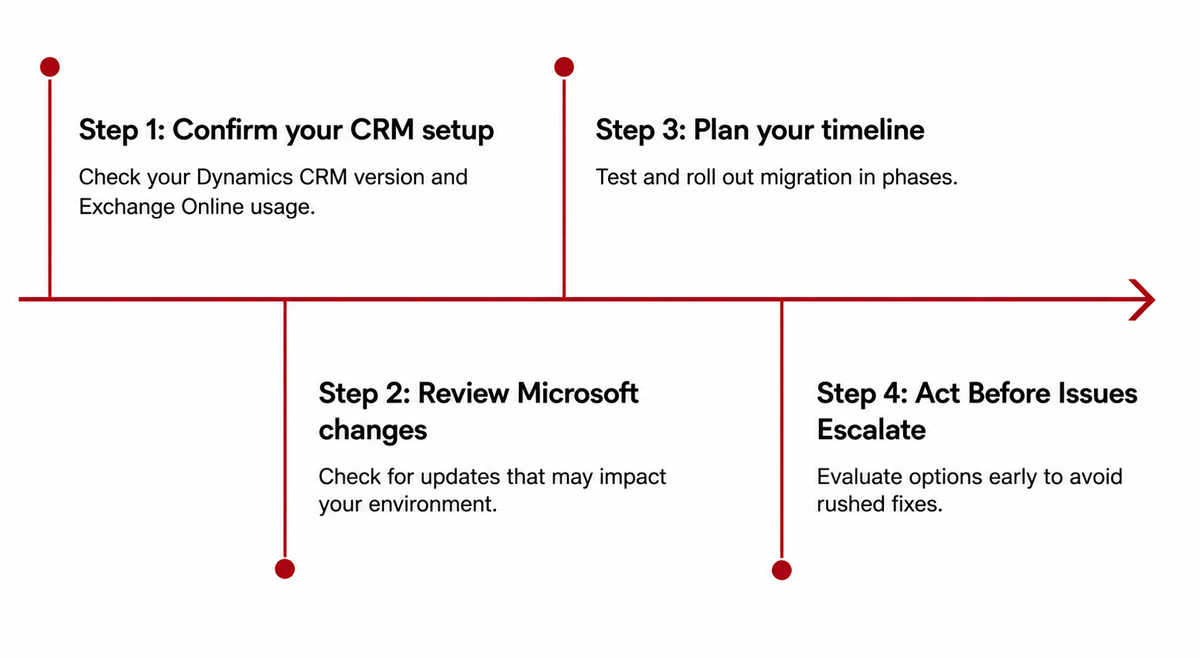
How Organizations Can Prepare for EWS Retirement
Preparing for the EWS retirement starts with understanding your current Dynamics CRM on-premises email integration. Follow these key steps to reduce disruption and make a smoother transition.
How Synoptek Can Help
Synoptek helps organizations navigate CRM modernization, integration changes, and cloud migration initiatives. From assessing current Dynamics CRM environments to supporting a complete Dynamics 365 migration from on-premises CRM, Synoptek works with teams to reduce disruption and build a practical migration roadmap.
The April 2027 Dynamics CRM deadline may seem distant, but migration planning, testing, and business alignment take time. Organizations that begin evaluating their options now can avoid unexpected email disruptions and rushed decisions.
Don’t wait for email workflows to stop working. Connect with our CRM experts to assess your Dynamics CRM environment and build a migration strategy that fits your organization’s goals.