
August 31, 2026 · by Synoptek Team 6 min read
Copilot Cowork represents a shift from AI assistants that answer questions to AI co-workers that execute multi-step enterprise tasks across Microsoft 365. It can gather information, analyze content, create documents and presentations, coordinate communications, and automate workflows while keeping humans involved for review and approval. However, successful deployment requires strong governance and security around permissions, data protection, human oversight, monitoring, auditability, and responsible AI use.
Have you ever wished you could hand off an entire work assignment instead of asking AI to help with just one small part?
Imagine you are preparing for an executive meeting tomorrow. You need to review the latest emails, pull information from Teams conversations, find the most recent project documents, research a customer update, create a briefing presentation, and prepare follow-up communications. Normally, that means opening several applications and working through each task yourself.
Now imagine telling an AI co-worker what you need and letting it work through those steps for you.
That is the idea behind Microsoft 365 Copilot Cowork. Rather than simply answering a question or drafting a document, AI co-worker tools for enterprise collaboration in 2026 carry out multi-step work across the Microsoft 365 environment.
Read on as we explore how Copilot Cowork and Microsoft 365 AI agents are changing enterprise collaboration, automating multi-step workflows, and reshaping how organizations approach productivity, governance, and AI-powered work in 2026.
The Role of AI Co-Worker Tools for Enterprise Collaboration in 2026
Enterprise collaboration has become increasingly complex. Employees move between Outlook, Teams, SharePoint, OneDrive, Word, Excel, CRM platforms, project management systems, and specialized business applications to complete everyday tasks.
Traditionally, employees have had to gather information from multiple sources, review and compare it, then manually turn their findings into reports, presentations, and stakeholder updates. A simple weekly project update can involve reviewing emails and Teams messages, checking project documents, comparing previous reports, drafting an executive summary, building slides, and sending the final update.
Traditional Process
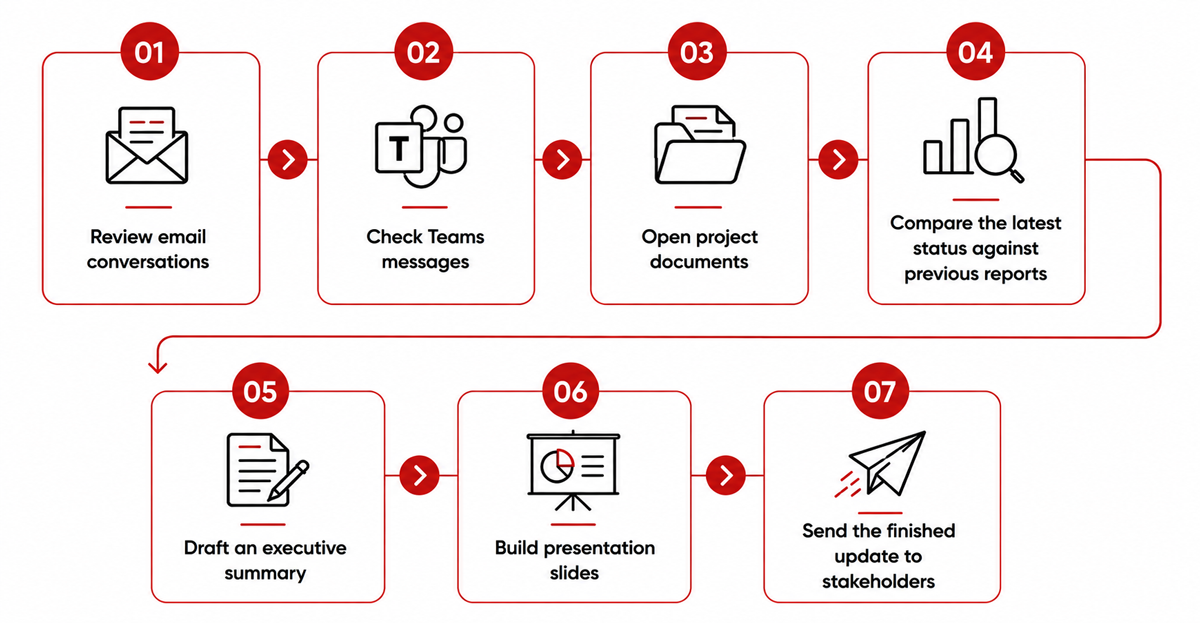
AI co-worker tools can bring these steps together. Instead of manually moving information between applications, an employee can provide the objective and let AI gather relevant context, work through the task, and create the required outputs. The employee stays in control, reviewing and approving the results before it happens.
AI-Driven Process
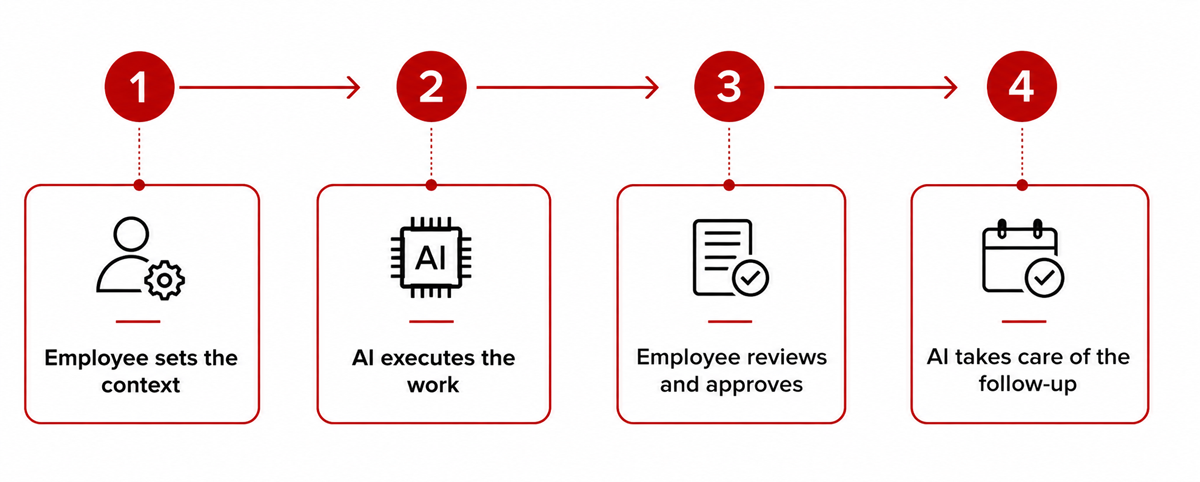
The potential benefits go beyond saving time. AI co-workers can reduce repetitive work, improve consistency, shorten the gap between information and action, and help employees focus on higher-value activities such as decision-making, problem-solving, and stakeholder engagement. At enterprise scale, these small efficiencies can translate into significant productivity gains.
What is Copilot Cowork?
Microsoft 365 Copilot Cowork is an agentic AI experience designed to carry out work on a user’s behalf. Instead of simply responding with information, Cowork can break a request into steps and work through them across Microsoft 365.
Once deployed, it can send or draft emails, schedule meetings, create Word documents, Excel spreadsheets, PowerPoint presentations, and PDFs, post in Teams, manage files in OneDrive and SharePoint, search organizational information, and conduct research. Users can watch the work as it happens, interrupt the process, provide additional direction, and approve actions when required.
This makes Copilot Cowork different from a conventional chatbot. A chatbot might answer, “What changed in this project this week?” A co-worker-style agent can take the next step: review project information, identify important changes, prepare a status report, organize the supporting information, and get the work ready for review.
How Microsoft 365 AI Agents Automate Enterprise Processes
Copilot Cowork is part of a broader Microsoft ecosystem in which AI agents can connect to enterprise information, applications, tools, and workflows. For organizations that need more specialized automation, Microsoft Copilot Studio enables custom agents designed around specific business processes, with connections to enterprise data and systems, defined actions, and controlled access.
A general-purpose AI co-worker can’t handle every workflow. Some require specialized knowledge, access to business applications, sensitive data controls, or defined escalation paths. IT teams can build custom agents around these requirements to automate targeted processes while operating within clear business boundaries.
Examples include:
- IT: Classify service requests, surface relevant knowledge, recommend resolutions, and escalate complex incidents.
- HR: Answer policy questions, support onboarding, and direct employees to approved resources.
- Finance: Analyze reports, explain variances, and prepare recurring management summaries.
- Sales: Research accounts, summarize customer interactions, and prepare meeting briefings.
- Operations: Coordinate repetitive workflows across multiple applications and information sources.
The key distinction is purpose-built execution. Rather than expecting one general-purpose assistant to understand every enterprise process, organizations can deploy specialized agents with defined roles, data access, actions, and governance, making AI automation more targeted, scalable, and aligned with business requirements.
Copilot Governance and Security for Enterprise Deployment
The more autonomy an AI agent receives, the more important AI governance becomes. An AI tool that only drafts an email creates one type of risk. An agent that can access organizational information, modify files, send communications, or initiate workflow actions requires a much more deliberate control framework.
While Microsoft provides governance controls for Copilot Studio, including access controls, data policies, sharing rules, and monitoring capabilities, organizations must address Copilot governance and security before widespread enterprise deployment. Key areas include:
- Identity and permissions: Agents should only access information and systems required for their assigned tasks.
- Data protection: Sensitive and confidential information needs appropriate classification and controls.
- Human oversight: High-impact actions should have appropriate approval requirements.
- Monitoring: Organizations should be able to understand agent activity and performance.
- Auditability: Important actions should be traceable.
- Responsible AI policies: Employees need clear guidance about appropriate AI use.
- Ongoing evaluation: Teams should test and monitor agents as workflows and business requirements change.
How Enterprises Should Prepare for AI Co-Workers
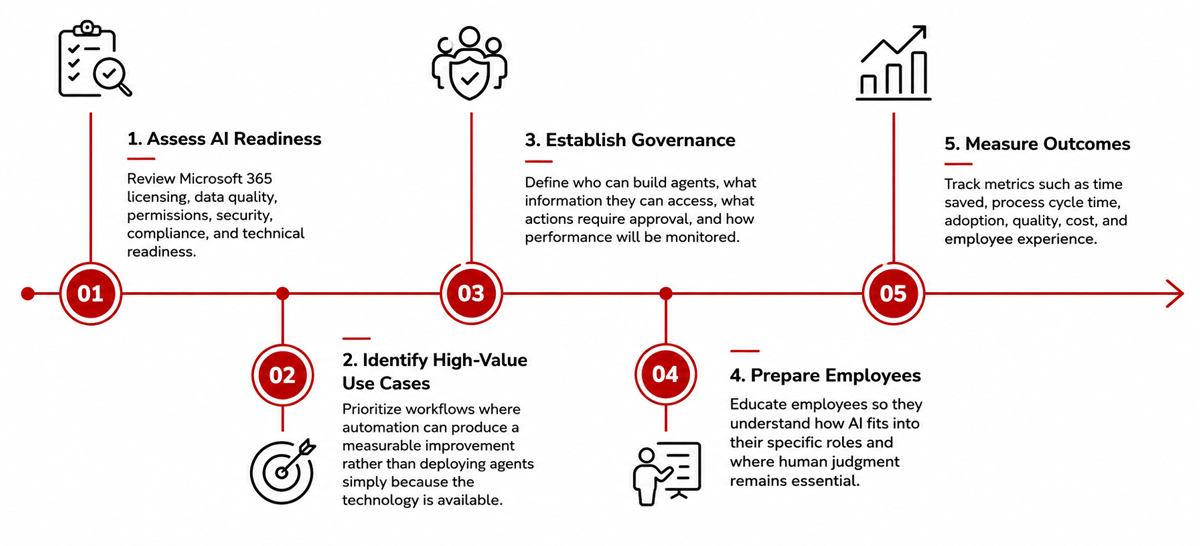
Organizations should first identify where employees are spending the most time on repetitive, manual tasks that AI could safely handle. This could include gathering information, preparing documents, conducting research, coordinating tasks, or managing routine communications. By focusing on these time-consuming processes, businesses can find practical opportunities where AI co-workers can make a real difference.
Build an Enterprise AI Strategy with Synoptek
AI co-workers are moving enterprise AI beyond answering questions and assisting with individual tasks. They can help organizations execute multi-step work, connect information across systems, automate repetitive processes, and give employees more time to focus on decisions and higher-value work.
But realizing that value requires more than turning on a new AI capability. Organizations need to identify the right workflows, prepare their data and Microsoft 365 environment, establish governance frameworks and security controls, and determine where human oversight remains essential.
Synoptek can help you take the next step. From assessing AI readiness and identifying high-value use cases to deploying Microsoft 365 Copilot, building custom Copilot Studio agents, and establishing governance, Synoptek can help turn AI pilots into production-ready enterprise solutions.
Ready to put AI co-workers to work? Contact Synoptek to explore your use cases, assess your readiness, and build an AI strategy designed around your business.