
October 29, 2026 · by Synoptek Team 9 min read
Microsoft Dynamics AX has evolved from a traditional ERP system into a connected, cloud-based business platform through Dynamics 365 Finance and Supply Chain Management. Over the years, Microsoft has expanded its capabilities across financial management, supply chain operations, analytics, automation, and AI, helping organizations manage increasingly complex business processes. With AI-powered assistance and agents becoming part of the ERP ecosystem, businesses still running legacy AX systems need to assess their modernization priorities and plan their transition to Dynamics 365.
Microsoft Dynamics AX has come a long way since its beginnings as a business management solution. What started as an ERP system with core accounting, trade, logistics, and production capabilities evolved into a comprehensive platform for managing complex business operations across industries and countries.
Microsoft’s acquisition of the technology and its subsequent evolution into Dynamics 365 marked a significant shift in enterprise software. Today, Dynamics 365 Finance and Dynamics 365 Supply Chain Management build on that foundation with cloud capabilities, integrated analytics, regular updates, and AI-powered assistance. For organizations still running legacy AX systems, understanding this evolution is an important step toward planning future upgrades and modernization.
Let’s explore how Microsoft Dynamics AX has evolved and what these developments mean for businesses preparing for 2027.
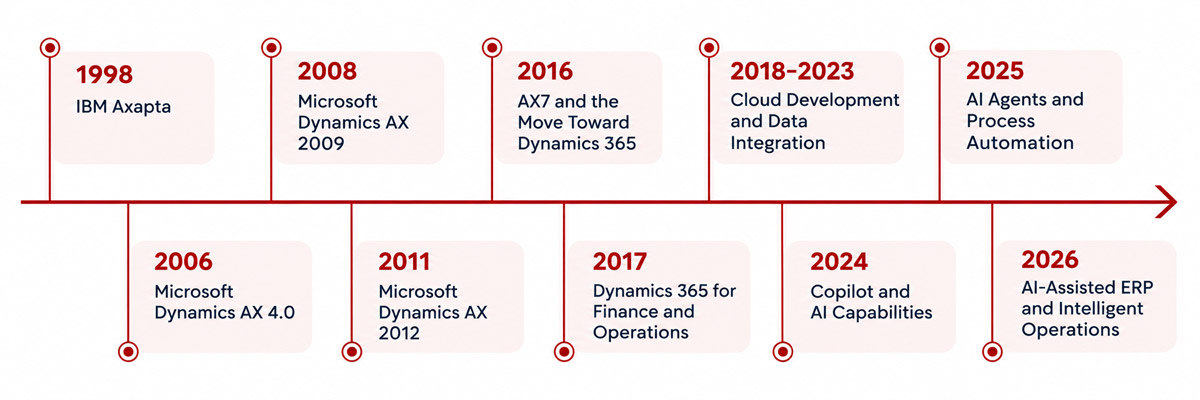
1998: IBM Axapta
IBM and Damgaard Data developed Axapta together, and it became Microsoft Dynamics AX. Released in March 1998, the ERP solution combined financial management and operational capabilities in a single system, helping businesses manage accounting, trade, logistics, and production.
Axapta introduced its own development environment, combining MorphX with the X++ programming language. Its support for multiple currencies, languages, and tax formats made it suitable for organizations operating across international markets.
Capabilities
- Financial Series: General ledger, cash flow, banking, accounts receivable, accounts payable, and invoicing.
- Trade Series: Sales orders, purchase orders, and inventory management.
- Logistics Series: Trade agreements, discounts, bills of materials, and material and capacity planning.
- Production Series: Work orders, production routes, shop floor control, and capacity planning.
2002-2006: Microsoft Dynamics AX 4.0
Following the merger of Damgaard Data and Navision Software in 2000, Microsoft acquired the combined company in 2002. Axapta subsequently became part of Microsoft’s business management product portfolio and was rebranded as Microsoft Dynamics AX. Released in 2006, Dynamics AX 4.0 introduced significant enhancements to integration, workflow, customization, and business intelligence capabilities, helping organizations connect enterprise applications and streamline business processes.
Capabilities
- Improved integration: Connected Dynamics AX with other enterprise applications.
- Web services: Supported system integration and application extensibility.
- Workflow automation: Helped route business processes according to defined roles and responsibilities.
- Business information access: Improved access to reporting and role-based information.
- Supply chain and manufacturing: Added capabilities supporting operational control and service management.
2008: Microsoft Dynamics AX 2009
Dynamics AX 2009 expanded support for businesses operating across multiple locations and countries. Enhancements to financial management, reporting, role centers, and supply chain processes helped organizations coordinate operations and give employees access to information relevant to their responsibilities.
Capabilities
- Multi-site operations: Managed financial and supply chain processes across locations.
- Planning and reporting: Supported business analysis and performance reporting.
- Role-based workspaces: Organized tasks and information around employee responsibilities.
- Business intelligence: Improved access to reports and business data.
- Compliance support: Offered country-specific functionality and embedded workflows.
2011: Microsoft Dynamics AX 2012
Released in 2011, Dynamics AX 2012 introduced broader enterprise functionality and a more flexible application architecture. It was particularly suited to midsize and large organizations with complex manufacturing, distribution, and financial management requirements.
Capabilities
- Financial management: Accounting, budgeting, financial reporting, and multiple legal entities.
- Supply chain management: Procurement, inventory, warehouse, and transportation management.
- Manufacturing: Production planning, quality assurance, and capacity management.
- Industry-specific functionality: Support for sectors such as industrial machinery, electronics, aerospace, and consumer products.
- Global operations: Multilingual, multicurrency, and localization capabilities.
- Business intelligence: Reporting and analytics for operational visibility.
2016: AX7 and the Move Toward Dynamics 365
In February 2016, Microsoft introduced the next generation of Dynamics AX, commonly known as AX7. The release replaced the traditional Windows client with a browser-based HTML5 interface, making the application accessible through a modern web experience.
In October 2016, Microsoft rebranded the solution as Dynamics 365 for Operations. The transition reflected a broader move toward cloud infrastructure, ongoing application updates, and closer integration with Microsoft’s business technology ecosystem.
Capabilities
- Browser-based access: Reduced reliance on the traditional Windows client.
- Cloud deployment: Azure-based infrastructure supported scalable deployments.
- Modern development: X++ development in Visual Studio improved the developer experience.
- Lifecycle Services (LCS): Supported implementation planning, deployment, monitoring, and application management.
- Enterprise integration: Connected ERP processes with other Microsoft applications and services.
This transition established the foundation for the subsequent evolution of Dynamics 365 Finance and Supply Chain Management.
2017: Dynamics 365 for Finance and Operations
Dynamics 365 for Finance and Operations expanded the cloud ERP approach, combining financial and operational capabilities with Microsoft’s evolving business applications portfolio. Organizations could manage financial transactions, procurement, inventory, manufacturing, and distribution within an integrated enterprise environment.
The platform also supported connections with Microsoft services and other business applications, helping organizations improve reporting and coordinate processes across departments.
Capabilities
- Financial management: Accounting, budgeting, cash flow, and financial reporting.
- Supply chain operations: Procurement, inventory, manufacturing, and distribution.
- Global operations: Support for international business requirements.
- Connected applications: Integration with Microsoft’s wider business application ecosystem.
- Cloud servicing: Ongoing improvements through application updates.
2018–2023: Separate Applications, Cloud Development, and Data Integration
After 2017, Microsoft continued to develop the platform through regular releases, integration improvements, and an increasingly cloud-focused approach.
In October 2019, Microsoft separated Dynamics 365 for Finance and Operations into two distinct applications: Dynamics 365 Finance and Dynamics 365 Supply Chain Management. This change gave organizations greater flexibility to adopt dedicated solutions for financial management and supply chain operations while retaining integration across the broader Dynamics 365 ecosystem.
Separately, Microsoft introduced Dynamics 365 Commerce, announcing its preview in October 2019. Built on the capabilities of Dynamics 365 Retail, Commerce provided an omnichannel solution connecting back-office operations, physical stores, call centers, and digital shopping experiences.
During the following years, Microsoft continued enhancing financial management, manufacturing, procurement, inventory management, reporting, and application integration. Power BI supported business intelligence and data visualization, while Azure data services and the Power Platform provided additional capabilities for connecting data, building applications, and automating workflows.
Key Developments and Capabilities
- Dynamics 365 Finance: Financial management, accounting, cash flow, and global financial operations.
- Dynamics 365 Supply Chain Management: Procurement, inventory, manufacturing, warehouse operations, and supply chain planning.
- Dynamics 365 Commerce: Capabilities for retail and connected commerce operations.
- Business intelligence: Power BI integration and improved reporting options.
- Workflow automation: Power Platform tools for selected business processes.
- Migration and modernization: Opportunities to review legacy customizations, data, integrations, and reporting requirements.
Microsoft Dynamics AX 2009 and Service Pack 1 reached the end of extended support on April 12, 2022. At the same time, extended support for AX 2012 and AX 2012 R2 ended on April 12, 2022, while AX 2012 R3 reached the end of extended support on January 10, 2023.
2024: Copilot and AI Capabilities
In 2024, artificial intelligence became a more prominent part of Microsoft’s Dynamics 365 roadmap. Copilot-related capabilities expanded across business applications, including finance and supply chain scenarios. In Supply Chain Management, AI developments included assistance with demand planning and tools designed to help users understand forecast results.
These developments marked another stage in ERP evolution. Alongside managing transactions and workflows, enterprise applications were increasingly incorporating AI to help users interpret business information and make informed decisions.
Key Developments and Capabilities
- AI-assisted demand planning: Support for forecasting and planning activities.
- Forecast insights: Tools to help users understand demand patterns.
- Financial automation: Continued improvements to financial workflows and analytics.
- Productivity assistance: AI capabilities within selected business processes.
2025: AI Agents and Process Automation
In 2025, Microsoft placed greater emphasis on AI-assisted workflows and agent capabilities across Dynamics 365. Developments included agent-based assistance for selected financial reconciliation and supplier communication tasks, alongside improvements to demand planning and operational analysis. Availability varies by feature and release.
Unlike conventional automation, which follows predefined rules, AI agents can use business context and data to assist with specific tasks. Their use in ERP environments still requires appropriate permissions, security controls, and human oversight.
Key Developments and Capabilities
- Financial reconciliation: AI agent capabilities to assist with selected reconciliation activities.
- Supplier communications: Automation of selected supplier interactions.
- Demand planning: Improved forecasting insights and analysis.
- AI integration: Options for connecting AI capabilities with enterprise data and business processes.
2026: AI-Assisted ERP and Intelligent Operations
In 2026, Microsoft continued investing in Dynamics 365 Finance and Supply Chain Management, with developments focused on financial processes, supply chain planning, compliance, and AI-assisted operations. The 2026 release wave 1 plan included enhancements across finance and supply chain capabilities, with AI-related developments involving areas such as demand planning and warehouse operations.
Microsoft also moved its roadmap communications toward the AI at Work roadmap from September 2026, reflecting its broader focus on AI-enabled business applications.
Key Developments and Capabilities
- Financial management: Continued improvements to financial operations, period-end processes, and compliance.
- Demand planning: AI-assisted forecasting and greater insight into demand patterns.
- Warehouse operations: Ongoing enhancements to inventory and warehouse processes.
- Procurement: Agent-related capabilities for selected purchasing and supplier activities.
- Platform updates: Continued delivery of application improvements and new functionality.
An ERP Platform That Continues to Evolve
The evolution of Microsoft Dynamics AX to Dynamics 365 illustrates how enterprise resource planning has moved from traditional business software to a connected cloud platform. From IBM Axapta and AX 2012 to Dynamics 365 Finance, Supply Chain Management, and the growing use of AI, each stage has expanded the ways organizations can manage financial and operational processes.
For businesses still running legacy AX, understanding this history provides context for assessing support risks and planning a Dynamics AX to Dynamics 365 Finance migration. For organizations already using Dynamics 365, continued attention to data quality, integration, security, and emerging capabilities can help keep the ERP environment aligned with business needs.
Is Your Dynamics AX Environment Ready for What’s Next?
With extended support for legacy Dynamics AX versions now ended, continuing with an outdated ERP can introduce maintenance, security, and modernization challenges. Synoptek helps organizations assess their current ERP environments, identify migration priorities, and build a practical roadmap to Dynamics 365.
Our 2-Day Dynamics AX to Dynamics 365 Assessment can help you identify the next step toward a modern ERP. Take the assessment today or explore our Dynamics 365 ERP services for more information.